


There are more AI writing tools than ever.
But most people pick one based on name recognition — not based on how it actually fits their workflow.
This market map breaks down the AI writing desktop app landscape in 2026 across two axes that actually matter:
- Execution Speed / Friction — How fast can you go from intent to result?
- Flexibility / Customization — How many tasks and modes does the tool support?
The Two Axes That Define AI Writing Tools
X-Axis: Execution Speed
On the left: tools that require a browser, multiple menu steps, or an open app window.
On the right: tools that activate instantly via a hotkey — no switching, no clicking, no context breaking.
Y-Axis: Flexibility
At the bottom: tools built for a single, specific task.
At the top: tools with multiple modes, custom prompts, libraries, and workflows.
Where a tool lands on this grid tells you more about its philosophy than its feature list.
The Market Map
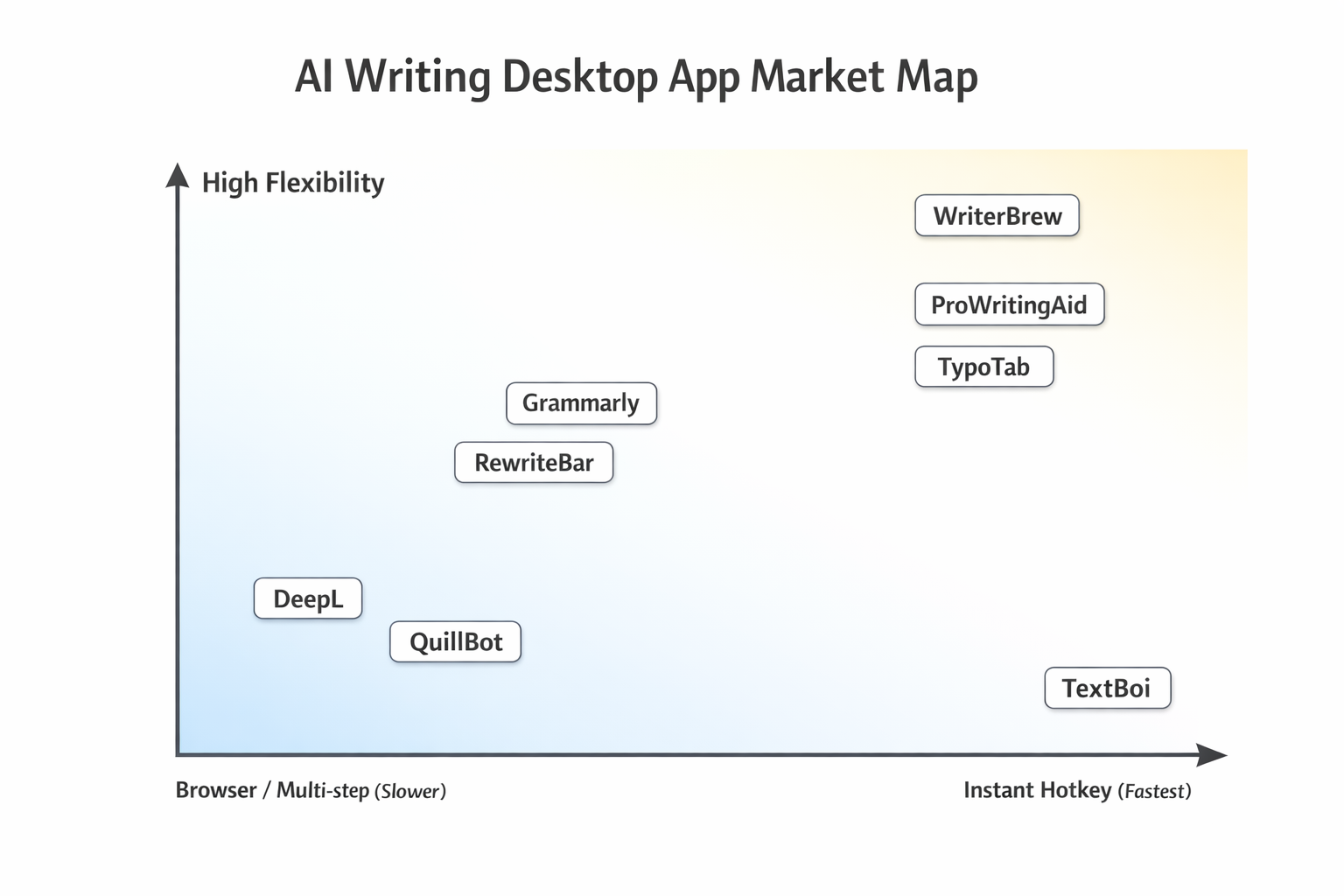
Tool-by-Tool Breakdown
DeepL — Translation Specialist
Position: Low flexibility / Medium speed
DeepL is the gold standard for translation quality.
But it's fundamentally browser-centric and single-purpose. You open the app or tab, paste your text, and get a translation. Great for that one job. Limited beyond it.
- Best for: High-accuracy translation workflows
- Limitation: No grammar fixing, no tone adjustment, requires app context switching
Grammarly — Comprehensive Grammar Platform
Position: Medium flexibility / Medium speed
Grammarly is the most recognizable name in AI writing assistance. It works as a browser extension that flags errors inline and offers tone suggestions.
But "inline" doesn't mean instant. You still need Grammarly active in a supported environment. And its UX is flag-based, meaning you react to suggestions rather than issuing commands.
- Best for: Passive grammar correction while writing in a browser
- Limitation: Limited outside supported environments, no command-driven workflow
QuillBot — Paraphrasing Tool
Position: Low-to-medium flexibility / Slow
QuillBot does one thing well: paraphrasing. You paste text into its web app, choose a mode, and click a button.
That's a lot of steps for a small task.
- Best for: Academic paraphrasing and rewriting
- Limitation: Web-only, multi-step execution, single primary function
RewriteBar — Command Palette Writing Tool
Position: Medium flexibility / Medium speed
RewriteBar lives in the macOS menu bar and activates via a command palette (Cmd+Shift+P). It supports 11+ AI providers (OpenAI, Anthropic, Google, Groq, etc.), custom prompts, and offers a one-time license option — which is rare in this category. It also supports 500+ languages for translation.
However, it's macOS-only and has no OCR capability. If the text isn't in a selectable field, RewriteBar can't reach it.
- Best for: macOS users who want AI provider flexibility and a one-time purchase option
- Limitation: macOS only, no OCR, command palette adds a step per action
ProWritingAid — Writing Improvement Platform
Position: Medium flexibility / Slow
ProWritingAid is a deep-analysis tool. It generates detailed style reports, readability scores, and structure suggestions. Powerful — but not fast.
You open a document, wait for analysis, and browse through reports. This is a review tool, not a reflex tool.
- Best for: Long-form content editing, manuscript review
- Limitation: Slow execution loop, not suited for quick inline tasks
TypoTab — Search-Style AI Text Tool
Position: Medium flexibility / Medium speed
TypoTab takes a search-bar approach to AI writing. You search for an action, select it, and apply it. It supports custom prompts and multiple modes.
Interesting UX, but still requires deliberate navigation to reach the result.
- Best for: Users who want a searchable command interface for AI writing
- Limitation: Requires interaction flow — not a zero-step experience
WriterBrew — Multi-Tool AI Utility
Position: High flexibility / Medium speed
WriterBrew is the most feature-rich tool in this category. It includes OCR, a prompt library, and multi-function support — all from a menu bar interface.
If your priority is having the most options available, WriterBrew covers a wide surface area.
- Best for: Power users who want a Swiss Army knife of AI writing tools
- Limitation: Menu-based navigation, can feel complex for quick tasks
TextBoi — Instant AI Writing Tool with OCR
Position: High speed / Expanding flexibility
TextBoi sits at the far right of the speed axis — faster than everything else — with a deliberately lean workflow.
The core mechanic: double-copy to trigger AI instantly.
No menus. No mode switching. No open window required. You copy text, copy again, and TextBoi runs your chosen mode silently — then pastes the result.
It's built around one idea: reflex interaction over deliberate navigation.
And there's a second shortcut most tools can't match: Cmd+Shift+C (Mac) / Ctrl+Shift+C (Windows) triggers built-in OCR — drag to select any area of your screen and TextBoi reads and fixes the text, even from screenshots, scanned PDFs, or apps where copy-paste is blocked.
Current modes:
-
Translate (150+ languages)
-
Proofread & grammar fix
-
Improve tone and clarity
-
Summarize
-
Custom prompt
-
Best for: Writers, non-native speakers, and knowledge workers who want zero-friction AI — including on text that can't be selected
-
Limitation: No passive inline correction while typing (requires manual trigger)
What the Market Map Reveals
Most AI writing tools compete on features.
They add more modes, more suggestions, more report types — and their UX gets heavier.
TextBoi competes on friction.
The question it answers isn't "how many things can your AI do?" — it's "how quickly can your AI get out of your way after doing the thing?"
This is a real product philosophy difference, not just marketing positioning.
Where to Choose Which Tool
| Use case | Best fit |
|---|---|
| High-quality document translation | DeepL |
| Passive grammar correction while browsing | Grammarly |
| Academic paraphrasing | QuillBot |
| Deep manuscript analysis | ProWritingAid |
| Feature-rich menu bar utility | WriterBrew |
| Fastest inline AI writing on desktop | TextBoi |
AI Writing Desktop Tools — Feature Comparison (2025)
| Feature | TextBoi | DeepL | Grammarly | QuillBot | RewriteBar | WriterBrew | TypoTab | ProWritingAid |
|---|---|---|---|---|---|---|---|---|
| Grammar Correction | ✔ | ✖ | ✔ | ✔ | ✔ | ✔ | ✔ | ✔ |
| Tone Adjustment | ✔ | ✖ | ✔ | Partial | ✔ | ✔ | Partial | ✔ |
| Summarize / Expand | ✔ | ✖ | Partial | Partial | ✔ | ✔ | Partial | ✖ |
| Translation | ✔ | Core Feature | ✖ | Partial | ✔ | Partial | ✖ | ✖ |
| Diff Visualization | Core Strength | ✖ | ✖ | ✖ | ✖ | ✖ | ✖ | ✖ |
| Instant Hotkey Execution | Core Strength | ✖ | ✖ | ✖ | ✖ | ✖ | ✖ | ✖ |
| Real-time Inline Correction | ✖ | ✖ | Core Feature | ✖ | ✖ | Partial | ✖ | Partial |
| OCR — read text from images & locked screens | ✔ Built-in | ✖ | ✖ | ✖ | ✖ | ✔ | ✖ | ✖ |
| Platform | macOS + Windows | Web + App | Cross-platform | Web | macOS | macOS | macOS | Web + App |
The Underserved Position: Speed-First AI
Most AI tools assume you're willing to context-switch.
Open an app. Paste text. Click through menus. Copy the result back.
For occasional use, that's fine.
For people who write constantly — emails, reports, documentation, Slack messages, Notion pages — that friction compounds into a real productivity tax.
TextBoi is built for that second group.
The double-copy trigger was specifically designed to feel like a keyboard reflex, not a software operation.
Final Thought: The AI Shortcut Category
If the existing category names are:
- AI App (Grammarly, ProWritingAid)
- AI Client (DeepL desktop)
- AI Menu Tool (RewriteBar, TypoTab, WriterBrew)
Then TextBoi occupies a different slot:
AI Shortcut — instant, invisible, always available.
That's the position this market map puts TextBoi in.
And as AI writing becomes more embedded in daily knowledge work, the tools that win long-term won't necessarily be the ones with the most features — they'll be the ones with the least friction.
TextBoi is available for macOS and Windows. Download and try it free.